Getting Started with Browser Extensions: A Quick Guide

Standard

This week, I’ve had the pleasure of diving into browser extensions, particularly focusing on creating a tool to help users identify potential bias on any webpage.

See the “finished” extension here (feel free to install and give it a like): https://chromewebstore.google.com/search/diversetalent

The process has been mostly straightforward, so I wanted to share a quick guide on how to get started with your first browser extension.

TLDR; here is a repo with a simple example of a browser extension: Browser Extension Template

The How: Building Your First Extension

Getting Started

To kick things off, you can use a simple and easy-to-follow template available on GitHub: Browser Extension Template. This template includes the essential files needed for a basic extension which showcases how to communicate between the popup and the current webpage.

Sample browser extension: watch for when text is selected on the current webpage

Key Files Explained

A browser extension generally contains the following key files:

  • manifest.json – Tells the browser what files are included with your extension and what permissions your extension needs.
  • popup.html – Optional. If you need to display a popup window when someone clicks your extension button in the toolbar.
  • content.js – Optional. The js to be injected into the current browser page so that you can access the DOM.
  • background.js – Optional. A place to add code that can respond to events, even when your popup is not showing.

The github repo contains more files than the ones listed above.

  1. manifest.json: This is the blueprint of your extension. It includes metadata such as the extension’s name, version, description, and the permissions it requires.
{
  "manifest_version": 3,
  "name": "Browser Extension Template",
  "version": "0.1.0",
  "description": "This is a template extension project for a browser extension.",
  "icons": {
    "16": "icon.png",
    "32": "icon.png",
    "48": "icon.png",
    "128": "icon.png"
  },
  "side_panel": {
    "default_path": "popup.html"
  },
  "permissions": ["activeTab", "sidePanel"],
  "action": {
    "default_title": "Browser Extension Template",
    "default_popup": "popup.html"
  },
  "background": {
    "service_worker": "background.js",
    "type": "module"
  },
  "web_accessible_resources": [
    {
      "matches": ["<all_urls>"],
      "resources": ["icon.png"]
    }
  ],
  "content_scripts": [
    {
      "all_frames": false,
      "matches": ["<all_urls>"],
      "js": ["content.js"],
      "css": ["popup.css"]
    }
  ]
}
  1. popup.html: This is the HTML file for the popup interface that appears when the extension icon is clicked.
<!DOCTYPE html>
<html>
  <head>
    <meta charset="utf-8" />
    <meta http-equiv="X-UA-Compatible" content="IE=edge" />
    <title>Page Title</title>
    <meta name="viewport" content="width=device-width, initial-scale=1" />
    <link rel="stylesheet" type="text/css" media="screen" href="popup.css" />
    <script src="popup.js" type="module"></script>
  </head>
  <body style="min-height: 400px">
    <h1>Popup</h1>
    <button id="clickme">
      Click me to scrape all content from current page
    </button>
    <div class="response-text" id="response"></div>
  </body>
</html>
  1. popup.js: This JavaScript file handles the logic for the popup interface.
(async () => {
    console.log('popup.js loaded');

    const getTabSelectedText = async () => {
        console.log('Popup: getTabSelectedText clicked');
        // Send a message to the content script to get the selected text
        const tabs = await chrome.tabs.query({ active: true, currentWindow: true });
        if (tabs.length === 0) return; // Exit if no active tab found
        chrome.tabs.sendMessage(tabs[0].id, { type: 'GET_PAGE_CONTENT' }, (response) => {
            console.log('Popup: Received response:', response);
            const responseElement = document.getElementById('response');
            if (responseElement) responseElement.innerText = response?.content || 'No content';
        });
    };

    document.addEventListener('DOMContentLoaded', () => {
        // Add event listener for the getTabSelectedText button
        const clickMeButton = document.getElementById('clickme');
        if (clickMeButton) clickMeButton.addEventListener('click', getTabSelectedText);
    });

    chrome.runtime.onMessage.addListener((request, sender, sendResponse) => {
        if (request.type === "SELECTED_TEXT") {
            // The page html content
            const content = request.content;
            const responseElement = document.getElementById('response');
            if (responseElement) responseElement.innerText = content;
        }
        return true; // Indicate that sendResponse will be called asynchronously
    });
})();
  1. content.js: This script runs in the context of the webpage and contains the logic for detecting bias.
  (async () => {
    "use strict";

    console.log('browser extension content.js loaded');

    const sendSelectedText = () => {
        const selectedText = window.getSelection()?.toString();
        if (selectedText) {
            console.log('SENDING SELECTED_TEXT message:', selectedText);
            chrome.runtime.sendMessage({ type: 'SELECTED_TEXT', content: selectedText }, (response) => {
                if (chrome.runtime.lastError) {
                    console.error('Error sending message:', chrome.runtime.lastError.message);
                }
            });
        }
    };

    document.addEventListener('mouseup', function (event) {
        console.log('mouseup event');
        sendSelectedText();
    });

    chrome.runtime.onMessage.addListener(
        function (request, sender, sendResponse) {
            if (request.type === "GET_PAGE_CONTENT") {
                // Extract the page's text content and the current selection
                const content = document.body.innerText;
                const selectedText = window.getSelection()?.toString() || '';
                sendResponse({ type: 'SEND_PAGE_CONTENT', content, selectedText });
            }
            return true; // Keep the message channel open for asynchronous response
        }
    );
})();
  1. background.js: This script handles background tasks and manages the extension’s lifecycle.
   // Handles background tasks for the extension
(() => {
    console.log('background.js loaded');

    // Ensure the sidePanel API is available before attempting to use it
    if (chrome.sidePanel) {
        chrome.runtime.onInstalled.addListener(() => {
            // Automatically open the side panel when the extension's action is clicked
            chrome.sidePanel.setPanelBehavior({ openPanelOnActionClick: true });
        });
    } else {
        console.warn('This version of Chrome does not support sidePanel API.');
    }

    // Define a function to handle incoming messages
    const handleMessage = (request, sender, sendResponse) => {
        console.log('Message received:', request);
        switch (request.type) {
            case 'SELECTED_TEXT':
                // Process the selected text, e.g., save it or call an API
                console.log('Background: Selected text:', request.content);
                break;
            // Add more cases as needed
            default:
                console.warn('Unhandled message type:', request.type);
        }
        // Indicate that sendResponse will be called asynchronously
        return true;
    };

    // Listen for messages from content scripts or popup
    chrome.runtime.onMessage.addListener(handleMessage);
})();

Build & Debug

To run the code, just follow these steps.

  1. Open your browser and navigate to chrome://extensions/.
  2. Enable Developer Mode.
  3. Click on Load unpacked and select the cloned repository of your extension.
  4. To make changes, edit the relevant JS or HTML files, then refresh the extension and the webpage to see your updates in action.
  5. To see debug messages, open the Chrome dev tools for the target webpage, popup and/or service/worker.

Store Submission

  1. Update the manifest.json file with the appropriate details (name, version, description, etc.).
  2. Zip the contents of your extension’s directory.
  3. Go to the Chrome Web Store Developer Dashboard.
  4. Click on Add new item.
  5. Upload the zip file.
  6. Add the necessary details and click on Publish.

Conclusion

Creating a browser extension can be a fun and rewarding project, opening up numerous possibilities to enhance user interactions on the web. With this guide, you should have a solid foundation to build your own extensions and even publish them for others to use. Happy coding!

PostHog – Essential product insights for startups

Standard

I’ll admit it; I used to think metrics were only an afterthought when creating a software product.

Build the product according to client specs, add some Google Analytics to capture the basics like pageviews, and that’s a wrap!

This approach may have been valid for projects with well-defined user requirements, where the market was already known, but startup products are different.

Startups need analytics from the start

Startups are testing an unknown market with an offering they cannot possibly know will fit in that market. Most startups fail and, of those that fail, most fail due to poor product-market fit or marketing problems.

If market alignment is so existential for startups then it makes sense that metrics & insights should inform the development and evolution of a startup product, not be added at the end.

But, as with most things, saying something is important is much easier than implementing it.

Startups need flexibility

I’ve used several tools over the years for insights & analytics (namely Firebase & Google Analytics). All are great on their own merits, but none have provided an all-in-one solution to my small startup needs. For a small startup scenario in the EU, I ideally need something that provides:

  • Control over the data. Data privacy is always important, especially in the EU where rules are arguably tougher than in the US.
  • Open source. Not only does open source give reassurance over how the data you are collecting is being used, but it also allows self-hosting if required in the future.
  • Scalable pricing. Small startups are generally unwilling or unable to pay upfront for tools. Having generous free tiers and fair scalable pricing allows startups to test their assumptions with minimal risk.
  • Developer experience. Small teams have very limited time & resources, so being able to move quickly is a must.
  • Usability. Having a tool that can equally be used by developers, marketers and managers is important, especially if the developers need to hand off the project at some point.

PostHog

PostHog is a new entrant but already fulfils all of the criteria above. It is an all-in-one customer insight platform that empowers startups to gather essential metrics, providing a clear pathway to refine their product and align it with market needs.

PostHog offers a suite of advanced features that go beyond basic tracking. Startups can leverage A/B testing to experiment with different versions of their product, ensuring they make data-driven decisions. Session replays allow teams to watch real user interactions, providing invaluable insights into user experience and potential pain points. Additionally, feature flags enable developers to roll out new features gradually, testing their impact without a full release.

PostHog also has a user-friendly interface, making it significantly easier to navigate than Google Aanalytics. This ease of use means startups can quickly set up and start collecting data without the steep learning curve.

As an open-source solution, PostHog offers the flexibility to self-host, addressing privacy concerns that come with third-party hosting. The approach is similar to Supabase’s open-core model, providing the best of both worlds: robust features with the option to maintain complete control over your data.

Try it on your next project

In summary, PostHog is not just another analytics tool; it’s a comprehensive user insights platform. It is specifically designed to help startups find their product-market fit. With an easy setup, the flexibility of self-hosting, and scalable pricing, PostHog is a valuable asset for any startup aiming to understand its users better and grow smarter.

What is gross margin? And should dev teams be talking more about it?

Formula for subscription gross margin
Standard

Gross Margin?

For startup companies, particularly those in the Software as a Service (SaaS) sector, gross margin is not just a financial metric; it’s a key indicator of product viability and business sustainability.

For a SaaS company, in simple terms, gross margin is the difference between how much each new customer costs in terms of 3rd party services and dev costs Vs how much that customer pays for their subscription.

Formula for subscription gross margin
The formula for subscription gross margin: https://www.drivetrain.ai/strategic-finance-glossary/saas-gross-margin

Understanding this metric could be existential for a startup that is looking to scale, yet it’s a topic often left out of daily conversations among development teams. But what has it even got to do with the dev teams involved in building SaaS products?

Unpacking Gross Margin in the SaaS Context

Gross margin is calculated by subtracting the cost of goods sold (COGS) from revenue, then dividing that number by the revenue, and finally multiplying by 100 to get a percentage. For SaaS companies, COGS typically includes:

  • Servers and hosting space for the software platform e.g. Vercel, Github, CDN, AWS, GCP, Azure etc
  • Licensing for third-party integrations and services e.g. stripe, openai, algolia etc
  • Expenses related to onboarding new customers (excluding sales and marketing).
  • Customer support and account management.
  • Fees and commissions to various partners.
  • Employee salaries related to operating expenses, broken out by core function such as development, DevOps, customer support.

https://www.drivetrain.ai/strategic-finance-glossary/saas-gross-margin

This metric is crucial as it reflects the efficiency and scalability of a SaaS product. High gross margins (80%+), which are common in the SaaS industry due to low incremental costs, suggest that a company can cover its operating expenses and invest in growth initiatives.

Dev teams can have a direct impact on this metric by the actions they take and the architectural choices they make.

If this metric has a direct effect on whether or not the company has a future, and development teams’ actions directly influence it, then it makes sense that this metric should play some part in team planning.

Practical Steps for Developers to Enhance Gross Margin

Understanding the importance of gross margin is one thing, but what can individual developers at SaaS startups actually do to influence this key metric positively? Here are some practical strategies:

  1. Evaluate Third-Party Services: While third-party services can add significant functionality to your product, they often come at a high cost. Where possible, consider the use of Free and Open Source Software (FOSS) alternatives that can provide similar functionality without the recurring fees.
  2. Build vs. Buy Decisions: Always weigh the costs and benefits of building a solution in-house versus purchasing it. Building in-house can be more cost-effective long-term, especially if it gives you more control over your service offerings and reduces dependency on external vendors. On the other hand, ask honestly how much building in-house will cost, factoring in total development hours, support and maintenance.
  3. How Much Do I Cost?: Developers at SaaS startups should periodically reflect on how they utilize their own time, considering the associated costs and benefits of their activities. Time is a finite resource, and how it’s spent can directly impact the company’s financial metrics, particularly gross margin. For instance, focusing on automating routine processes, improving system efficiencies, or eliminating costly dependencies can have a significant positive effect on the company’s profitability. This reflective practice not only fosters a more financially aware culture within the team but also encourages developers to make strategic choices that contribute directly to the business’s bottom line.
  4. Optimize Code Efficiency: Avoid wasteful code patterns that consume unnecessary resources. Efficient code reduces server load, which can save on hosting costs and improve scalability. Ask things like:
    • How many round trips are we doing to the server?
    • How much data is going over the wire?
    • Could this be cached?
    • Can we spread the load between various vendors to maximize ‘free’ tiers?
    • What will happen at scale?
    • Is there a different service I can use?
    • Do end users really need this expensive feature?
    • Is this index appropriate and efficient?
  5. Provide Robust Support: Efficient support systems can drastically reduce the cost of customer service over time. By ensuring that your code is maintainable and your documentation is thorough, you help reduce the need for extensive support resources.

Changing Team Development Cycles

For SaaS startup teams, integrating an understanding of gross margin into the development cycle involves a few strategic changes:

  • Regular Financial Updates: Including gross margin insights in regular project or company updates can help tech teams understand business outcomes and see the bigger financial picture.
  • Training and Development: Offering basic financial training to developers, focusing on how SaaS business models work and the importance of metrics like gross margin, can enhance decision-making at all levels.
  • Cross-Department Collaboration: Encouraging collaboration between finance and development teams can ensure that technical decisions are made with a clear understanding of their financial implications.

Conclusion

For SaaS startups, especially where agility and efficient scaling are crucial, gross margin is not just a number for the finance team to worry about. It’s a vital sign of how well the company’s offerings meet market needs without sacrificing profitability. By bringing gross margin into the conversations that development teams are having, SaaS startups can foster a more holistic approach to building and scaling their products. This not only ensures better financial health but also aligns product development with long-term business success.

AI all the things?

Standard

AI is incredibly powerful and it is relatively easy to add a rudimentary integration to new and existing software. It’s easy to get caught up in the hype and see every problem as solvable with an AI hammer.

But just because you can, doesn’t always mean you should.

Don’t get me wrong, I use AI-augmented tools every day and am amazed at what they do for my productivity. I also create AI-augmented features in the software that I build.

However, if I reach for the LLM AI “hammer” first, I bypass the opportunity to achieve better results and user experience. By focusing on the root problem at hand and structuring my data a bit better, I could nrgate the need for AI and achieve better outcomes.

For example, if your software needs to match job seekers with job specs, you could reach for the AI hammer to do the work, but you don’t need to. Why? Because AI yields “poorer” quality results than getting human assistance breaking down the constituent parts of a user profile and the parts of the job spec into structured data, matching these structured pieces, and human oversight to make the final judgement on a ‘good’ match.

For example, if your software needs to generate a list of similar job titles to one listed in a job post, you could reach for the AI hammer to do the work, but you don’t need to. Why? Because it might be cheaper, quicker and yield adequate results using existing databases like the US O*Net database of careers and salaries.

The point is, AI can do many things, but it’s not a panacea. You might find you get better results by exploring the root user problem and structuring new or existing data to solve the problem more accurately.

NIDC 2023 – Startup Priorities

Standard

Recently I had the absolute pleasure of talking at the 2023 Northern Ireland Developers Conference.
My talk was titled “The Art of Bootstrapping: Focus on the things that REALLY matter” and took a look at what the priorities of a startup should be.

TL;DR: According to the data, startups spend too much time & resources on relatively unimportant things, compared to a lack of focus on product market fit. To get an idea of what “product-market fit” equates to in practice for startups, see the following advice from Andrew Gadzeki (founder of Acquire.com)

The NIDC is my favorite conference to go to for several reasons, but the main reason is that it is a conference by developers, for developers. Everyone is there to share or to learn. In the spirit of sharing, I wanted to share the slides from the talk in case they can help anyone else.

High-Speed Web: Start with the End in Mind

Website Speed
Standard

The speed of your website is important to users. But in this age of pay-per-compute, reducing processing all along the chain is important to keep owner costs down too.

Fortunately, in today’s modern web, both of these seemingly competing requirements actually complement each other; reducing processing costs can be achieved by improving site speed.

To explore how to improve site speed and reduce overall processing, lets start with the end in mind and work backwards.

Starting with the customer, what consititutes a ‘good’ user experience, in terms of speed?

Ultimate User Experience?

Imagine you are a first time visitor to your site. The ideal situation would be if an immediate view of your site was instantly available to the device you’re using. No javascript processing, no querying for data, no image optimizations, just the browser showing HTML and [inline] CSS (or even one big snapshot image of your content).

Bear with me, I know some sites need to show dynamic data and some do not, but remember, at this point, you’re just an ordinary user. You dont care about what goes on in the browser and on the server. Neither do I care what static vs dynamic is, or what pain it takes to achieve results. You just want a great experience.

As a user, I want to see the content immediately. By the time I’ve made sense of the initial page (0-3.8secs), I want to interact with it.

If the data a customer is viewing is updated server-side while the page is open, these updates should be pushed to me automagically. Getting new data should not rely on me to fetch the data e.g. by hitting some kind of refresh button to call back to the server.

If the customer leaves the site and comes back to it, by the time I have indicated that I wish to view the page (preemptive rendering?), it should already be fully loaded and no stale data exists on the screen. If any updates have been made to the page since I last saw it, the changes, and only the changes, should have been pushed to my device, using as little bandwidth as possible.

All sounds great? But are these demands even possible using the latest tools/technologies for web and server?

Server Side Rendering

Arguably one of the most important things is to show the content of your site in the quickest way possible.

Generally, the steps that a browser takes to display a web page are as follows:

  1. A request to the server is made for a webpage.
  2. The server decodes this request and the page, and its resources (files), are downloaded.
  3. The web browser uses the page resources to build the page.
  4. The page then is rendered (displayed) to the user.

The bottle-neck in this process are steps 2 + 3 i.e. downloading the resources and ‘building’ the page as the resources become available. Rendering a ‘built’ page, stage 4, is what a browser is really good at.

Can we improve, or even skip, steps 2 + 3 to give users a better experience?

If the customer’s browser isnt going to do the hard work to pull all the resources together to build the page, who’s going to do it then?

Combining and building the page can be perfomed on the server instead. The subsequent ‘built’ page can be the resource that is served to the customer.

Server side rendering is an ‘old’ method of serving web pages. Before client-side Javascript was as powerful as it is today, SRR was a common way to serve dynamic web pages.

What’s changed is that now you can use Javascript on both the client and server. You can now replace PHP, Java, ASP etc on the server with NodeJs. This certainly helps with code reuse between client and server, but are we actually any further forward?

The principles are still the same. Client browser makes call to server, server dynamically creates a webpage containing an initial view of the page, server then delivers the page to client.

Server side rendering certainly solves the processing problem for the customer but we’ve just pushed the problem server-side. Not only have we increased the amount of processing that we, the site owner, has to pay for. We are also not much further in improving the overall speed of the site. Certainly, the customer may see a more complete view of your site sooner. Also, the server may have better access to some of the resources. But the overall amount of processing to build the page stays relatively the same.

If we, as a site owner, are now paying for the processing to ‘build’ an inital view of the site how can we make this process as efficient as possible?

Static First

The vast majority of content on the web changes infrequently. Even sites with ‘dynamic’ content, usually only a small amount of the total content of a page is truly dynamic.

If the same content is going to be viewed by more than one visitor, why generate it more than once? It might not be a big issue if you only have 2 visitors. But even with 11 visitors, you still might be doing 10x more processing than was needed.

If as much of your content can be precompiled i.e. the data has already been fetched, the styles applied and html generated preemptively, it can be delivered to the user quicker. If fact, if the content is already compiled, we can take the server out of the chain completely for this interaction, and allow the browser to access the content directly from a location close to the customer.

The ‘static first’ strategy is to compile a static view of the page first, serve it from a CDN, delay enabing javascript until the page has loaded, then hydrate any stale dynamic data.

By adopting static first you can potentially reduce your hosting costs to cents per month, as opposed to dollars, AND provide a blisteringly fast experience for your customers

But what about pages that are never viewed? To statically generate an entire site, you need to generate and manage updates for all potential routes in your website. You might be generating hundreds or thousands of web pages that real users may never visit. However, although ‘real’ users may not visit these pages, it is likely, and welcome, that at least 1x crawler bot will want to access these pages (unless it is content not for the eyes of search engines).

Caching Vs Static Site

So if having assets ready and available on the network, close to the user, is preferable. Is this not just server caching?

Yes and no. There are a number of different caching options available for your site. You can cache the individual items that are referenced by your page e.g. images, css files, database queries etc, or you can cache the page itself, or both. A static first strategy will try to cut the cord with the server. The strategy does not require database query caching and processes as much into a cachable unit i.e. page caching. Caching is generally performed dynamically i.e. the caching happens when one or more users access a particular page. Static site generation is performed pre-emptively i.e. before any users access a particular page. Caching and static site generation both have the aim of making reused assets as available and as close to a user’s device as possible; the difference is if this is done entirely pre-emptively or dynamically.

Static First, Only Update Dynamic Data

However, frequent updates may be unavoidable depending on the type of site. For dynamic sites, it is not feasible to continually pre-compile all views for all users, especially when the data is changing frequently.

But remember again, your user does not care. Mostly, they dont understand the difference between static and dynamic sites; they want to see the important content, fast.

You can aim to statically compile as much of the page as possible beforehand, but the ‘dynamic’ parts will involve some sort of processing. As a first time user, I may accept having the page load, seeing a placeholder where the dynamic data should be, and then ‘hydrating’ the data on page load. On the other hand, the user may, in this instance, prefer a slightly slower page load, if the page loads with the data already fully ‘hydrated’. The choice probably depends on what makes your customer happiest.

Subsequent Visits & Data caching

Up until now we’ve generally been concentrating on the scenario when customers first visit your site. When a customer visits your site again, the situation is slightly different. A returning customer will already have, on their device, many of the resources for the page. If nothing has changed, they may even already have everything to show the page again.

As a returning user, it makes little sense for me to have to contact the server again, have a new view generated by the server and download a new page. If only a small subsection of the page I already have has changed, this is unnecessary processing.

The ideal situation is if the server actually pushes my browser updates. When this happens my browser doesnt have to continually ask if new data is available. An even better scenario is if the server has already pushed me the data before I open the page again.

Even if you dont consider websockets and/or service workers you still have the opportunity to cache api data on the server. If a piece of data has not changed since the last time your browser (or any other browser) asked the server for it, it introduces unnessecary processing. Not for the feint hearted, but api caching can be achieved using the ETag header of a HTTP call.

Final Note. Software Development is hard.

There are only two hard things in Computer Science: cache invalidation and naming things.

— Phil Karlton

There are lots of difficult things about software development, but cache invalidation is the devil.

To reduce processing, all the methods above require caching in some shape or form. Static website generation is just page caching by another name. Putting things in cache is easy, knowing when to update them is incredibly difficult.

If your website page changes url, should you rebuild your entire site in case other pages reference the changed page? Does this re-introduce more processing than its worth?

If you statically compile your stylesheets inline into the page, what if a stylesheet changes? Does every page need compiled again, even if it doesnt make use of the changed style?

If a property in a row of data in your database changes, how do you invalidate your api cache? What if the data is referenced by another item in the cache?

If you are a masochist and like solving these type of problems, have at it. For the rest of us mere mortals, look to use a tool or service that helps you manage these problems.

Here is a non-exhaustive list of some newer tools and services that help in this space:

Hugo – Static website builder

Shifter – Compile your WordPress site to static

Vercel – JAM Stack + React Server Side Rendering + Hosting

Netlify – JAM Stack + Hosting

Webiny – Almost serverless Static website builder + API Generation

Svelte – Javascript framework that precompiles to plain JS so you dont need to deploy and load a framework with your webapp.

FOSDEM 2020 & Web Fonts Performance

Standard

FOSDEM is a free and opensource conference held in Brussels every year. There is no admission charge to the 2 day event and the topics under discussion are incredibly diverse. If you are interested in anything and everything opensource, FOSDEM has you covered.

This year was my 2nd year at the conference and, yet again, it did not disappoint. Most of my time was spent in the Web performance & Javascript developer rooms which were packed out. I also managed to get to some ethics talks and to the Quantum Computing room (but quickly scarpered out of there when things got complicated).

I learned quite a bit there, but one quick win that I want to share with you was on web font performance. During the Sia Karamalegos talk on web fonts she shared some quick tips on getting your fonts to load quicker. The full talk is embedded below, but the tips are as follows:

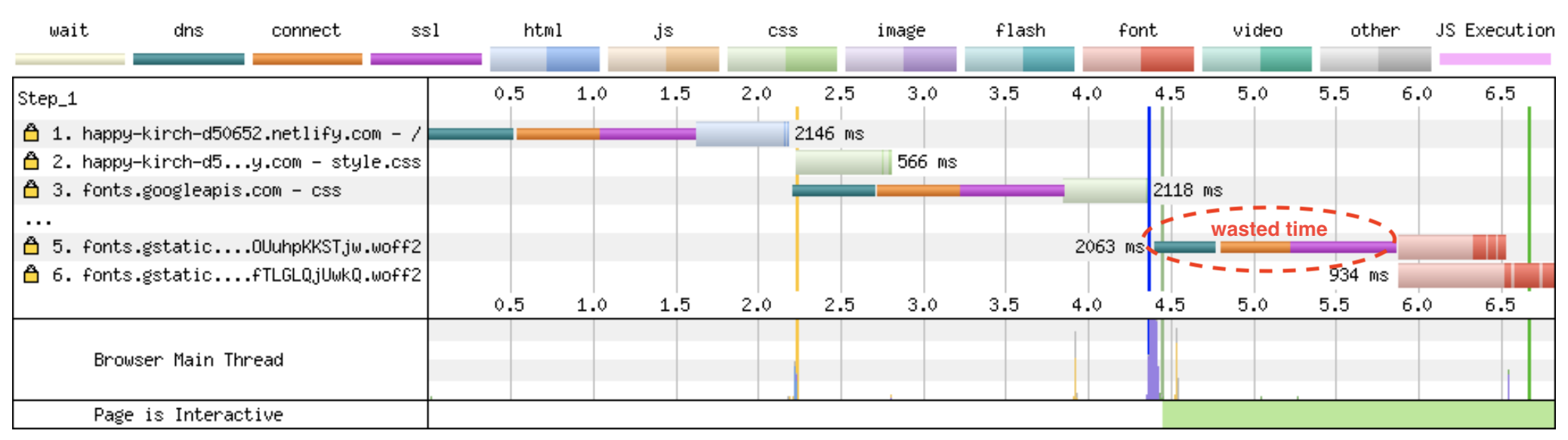
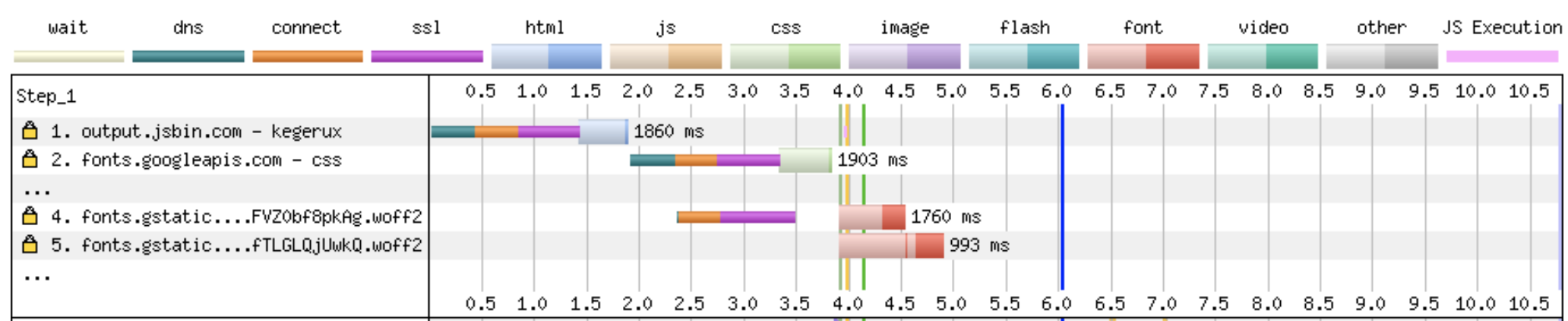
  • Preconnect External Fonts. If you are loading external fonts e.g. Google Fonts, a quick performance tip was to use the “preconnect” tag. Using this tag will establish a handshake with the external server before the resource is loaded. With the connection warmed up, it will take less time to download the resource when the time comes. *A small caveat to this, only preload things definately used on the page, otherwise it is doing extra work that might not even be needed.*
/* the usual way of loading google fonts */
<link href="https://fonts.googleapis.com/css?family=Muli:400"
      rel="stylesheet">
Google fonts load waterfall showing wasted time from loading from extra connection time
Wasted Time Loading Google Fonts
/* A better way of loading */
<link rel="preconnect" href="https://fonts.gstatic.com/" crossorigin>
<link href="https://fonts.googleapis.com/css?family=Muli:400"
      rel="stylesheet">
Google fonts load waterfall showing preconnect
Performance Improvement
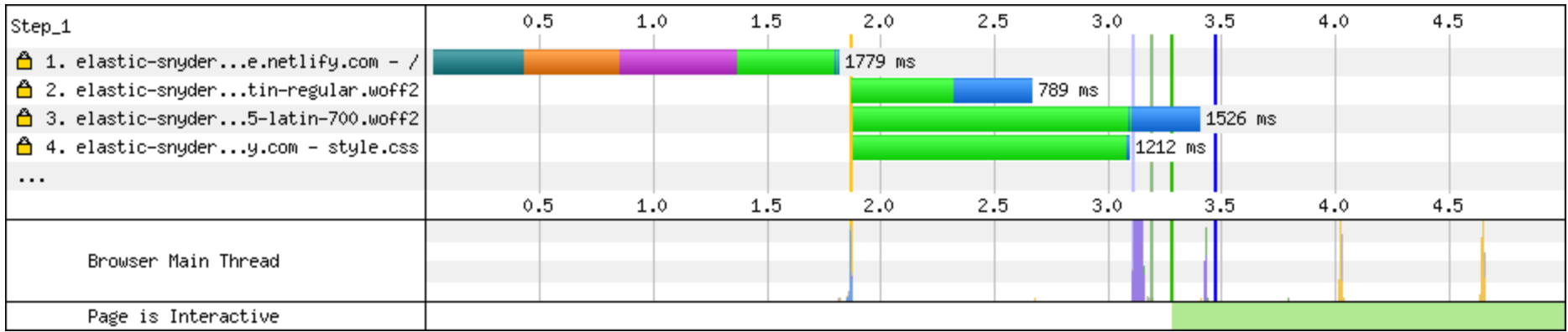
  • Preload Self-hosted Fonts. If you are loading self-hosted fonts, the tip was to use the “preload” tag to load the fonts quicker. The “preload” tag will fetch a resource (without actually executing it). This means that the files will be downloaded right away and will not have to wait on other resources to be loaded.
/* loading self-hosted fonts */
<link as="font" type="font/woff2"
  href="./fonts/muli-v12-latin-regular.woff2" crossorigin>

<link as="font" type="font/woff2"
  href="./fonts/muli-v12-latin-700.woff2" crossorigin>
Google fonts load waterfall showing local font waiting to load until after CSS
Wasted Time Loading Self-Hosted Fonts
/* a better way */
<link rel="preload" as="font" type="font/woff2"
  href="./fonts/muli-v12-latin-regular.woff2" crossorigin>

<link rel="preload" as="font" type="font/woff2"
  href="./fonts/muli-v12-latin-700.woff2" crossorigin>
Self-hosted waterfall showing preload

Resource Hints

To explain the difference in the “rel” tags, here is a quick cheet sheet from @addyosmani.

Full Video

Please check out the video below for the full talk which also includes tips on FOIT , variable fonts, and tooling.

Full Talk On Font Performance

Firebase Cloud Firestore

Standard

NoSQL, huh, whats is it good for?

I am not a huge fan of NoSQL. If you can keep your data structured, you should keep your data structured. Also, I have never, to date, worked on a project where a relational database was not scale-able enough to cater for the amount of data I needed to throw at it. NoSQL databases, like Firestore, have their uses, but for most production projects I’ve worked on so far, a relational database was either the ‘best’ choice or ‘good enough’.

However, sometimes, the structure of the data is unknown or likely to change. One such occasion is when you are starting out on a project. For prototype web applications I have found that NoSQL (Mongo, Firebase etc) can really speed up the initial stages of the project. Firebase’s new Cloud Firestore offering is a really useful NoSQL database for prototyping projects.

Real-time Database Vs Cloud Firestore

Firebase used to call its database offering ‘Realtime Database’ it now has a new offering called ‘Cloud Firestore’. Both are currently supported and available through the console, but it does appear that Firebase are trying to coax users to use the newer, but still in beta, Firestore.

The main difference between the two seems to be the data model. One of the frustrating things about the Realtime database was that you needed to de-normalize your data in order to use the queries effectively. If your data was hierarchical in nature you found yourself having to jump through hoops in order to use the realtime database effectively e.g. because you are always returned the entire sub-tree for a query, you needed to create separate trees for your data to avoid bloat in your result sets.

Cloud Firestore FTW

Firestore is not just any old NoSQL database, it has the following compelling features:

  • Easy to setup. The Firebase docs do a great job of helping you get started in whatever language you use (web, IOs, Android, Node, Go, Python, Java).
  • Easy to use. I have tried to think of a way that the Google team could have made it even easier to use the SDK… but failed.
  • Realtime. Real-time means real-time, try it out, create a simple project, hook your UI up to some data, watch the data change as you change the data in your console.
  • Scalable. So they say, sadly I’ve not had to use the scalability super powers yet.

Recommendation

Even though its still in beta, I would thoroughly recommend choosing Firestore over the realtime database for new projects. For existing projects, which currently use the realtime database, the choice is not as simple. Migrating to the Firestore is not a simple task due to the vastly different datamodels. Take a look at the pros and cons to determine if it is indeed worth the migration effort.


In the next blog post I’ll show how you can get started with Firestore and build upon the Authentication post to tie authentication events to saved user data.


Firebase Authentication

Standard

Tools For Your Tool-Belt

As a freelance developer its good to have a number of different tools in your tool-belt for when the situation demands. Firebase, and in particular, Firebase Authentication, has proven really useful over the past couple of years.

JWT

Most projects that I work on nowadays require some sort of user authentication. In the past I have used JWT or basic auth as my go-to solutions for authentication. However, even those these methods are fairly straightforward, I still had the nagging feeling that “This is a common problem, there must be a way to make this even easier.”.

JWT is great and easy to get started with but it is not always plain sailing; basic auth is well….. basic. JWT is very similar to Firebase Authentication in that you can use a 3rd party to authenticate users (using the Auth0 service) and not have to set up your own authentication server and process. However, manually persisting tokens on the client side and handling the clean up on expiry, logout etc, still felt verbose to a lazy dev like myself.

Firebase Auth

Firebase Authentication is easy to set up, the wide range of SDKs are easy to use, is free to start using, and “supports authentication using passwords, phone numbers, popular federated identity providers like Google, Facebook and Twitter, and more”.

Most of my experience using Firebase authentication has been in web apps or hybrid mobile app development; below are some really quick steps on how to get started for web:

  1. Sign up for a Firebase account and create a new project.
  2. Choose “Add firebase to your web app” and follow the instructions i.e. include the JS library and add the configuration details to your app.
  3. Add a screen which asks the user for an email address and password. Then pass these details to the “createUserWithEmailAndPassword” SDK function to create a new user.
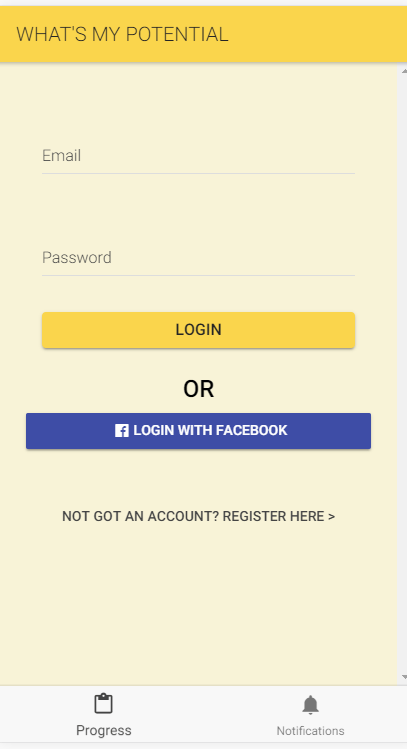
  4. Add another screen which asks for an email address and password, then pass these details to the “signInWithEmailAndPassword” function. When the function returns you should now have an authenticated user! I could go into more detail on the other methods you can use e.g. “signOut”, but most of them really are self-explanatory and the docs do a great job of showing you how.

Add a login screen with text boxes and a login/register button, then hook the button click to the Firebase SDK methods

Facebook, Google, Twitter, GitHub

To add Facebook, Google, Twitter or Github authentication just:

  1. Enable the required type of authentication through the “Authentication” tab on your Firebase console (following any specific instructions for each provider).
  2. Add a button to your login page for each provider you wish to use.
  3. Hook up the button click to use the appropriate SDK method on the client e.g. “signInWithPopup(new firebase.auth.GoogleAuthProvider())”
  4. After the user has authenticated themselves through the popup window, your call should return and you should now have a [Google] authenticated user.
  5. *A word of caution for hybrid mobile developers* Popups will not work on your hybrid mobile app, you will need to use native Facebook/Google libraries to achieve the same thing e.g. using facebook sign-in for Ionic.

Mobile, federated, logins are waaaaaay more difficult!

WordPress REST API – Part 4 – Ionic 3

Standard

Ionic 3 + Angular 4

This post follows on from posts about hybrid mobile app development using the new WordPress REST API and Ionic: Part 1, Part 2, Part 3

Part 3 contained a walk through of the Ionic 1 code. What follows is a walk through of the code for an Ionic 3 app.

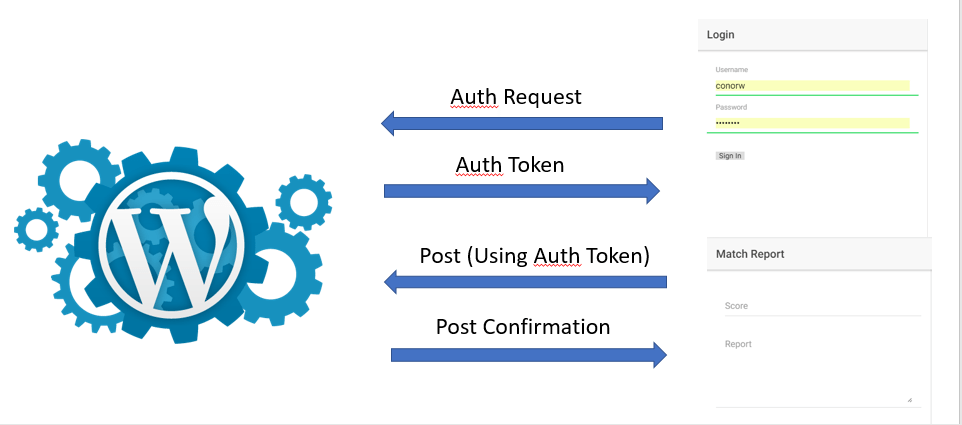
From following the steps in part 2 By now you should have a [very basic] Ionic app running in your browser. The app will allow you to:

  • Authenticate with your remote, WordPress REST API enabled, website.
  • Make a post from the mobile app to your WordPress site.

Ionic 3 to WordPress

Ionic 3 to WordPress

Pretty simple stuff.

The code that performs the magic is pretty simple too.

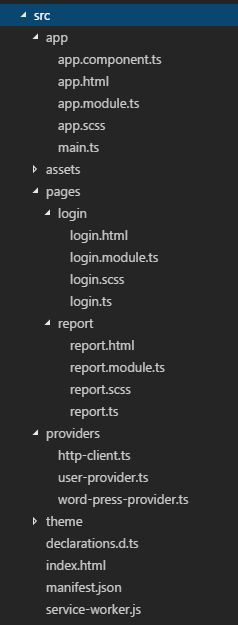
Ionic Project Structure (Ionic 3)

Ionic 3 Project Structure

Ionic 3 Project Structure

As you can see from the folder structure below there are quite a few folders in our Ionic App.

However, the important files and folders are as follows:

  • src/app: The 1st component to be shown on screen for the app. Things like navigation routes are configured here.
  • src/pages: The pages for the app are in here i.e. the Login and Report pages.
  • src/providers: This folder contains reusable services to perform business logic e.g. authentication and connection to WordPress
  • ionic.config.json: This file contains configuration options for the app. In Part 2, we changed a setting in this file to point to our WordPress site.

The folder structure is much like any other Angular 4 application, so we will head straight to the code to see what the key lines are:

/app/app.component.ts

As this component is the entry component for this app we configure if the user should be navigated to the Login or Report screens on startup.

In this file we:

  • Start listening to our UserProvider (see user.provider.ts) to see if the logged in/out event is fired.
  • If the logged in event fires navigate to the Report page, otherwise go to the Login page.
constructor(
    private events: Events,
    private userData: UserProvider
  ) {
    // start listening to login and log out events
    this.listenToLoginEvents();
    // check to see if user has logged in before
    // if they have there will be a logged in event fired
    userData.checkedLoggedInStatus();
  }

  listenToLoginEvents() {
    // if the user is logged in then navigate to the Report page
    this.events.subscribe('user:login', () => this.rootPage = Report);
    this.events.subscribe('user:logout', () => this.rootPage = Login);
  }

/src/providers/user.provider.ts

In the previous step we saw that a UserProvider was referenced; this provider is declared in user.provider.ts.

The main job of the UserProvider is to check the username and password in order to receive an authentication token from the WordPress server. This job is outlined in the ‘login’ function.

The login function will:

  • Contact the WordPress server with the username and password to ask for an authentication token.
  • If successful the token will be used in every subsequent http call to the WordPress server. The way we do this is by creating our own http client and injecting the token in every header (see http-client.ts).
  • The authentication token will be stored in case the user comes back to the app at a later date.
  • An event is fired to tell subscribers that the user is now logged in.
// this is a unique token for storing auth tokens in your local storage
  // for later use
  AUTHTOKEN: string = "myauthtokenkey";

  // determine if the user/password can be authenticated and fire an event when finished
  login(username, password) {
    let data = { username: username, password: password };
    // remove any existing auth tokens from local storage
    this.stor.remove(this.AUTHTOKEN);
    // the important bit, contact the WP end point and ask for a token
    this.http.post('/server/wp-json/jwt-auth/v1/token', data).map(res => res.json())
      .subscribe(response => {
        // great we are authenticated, save the token in localstorage for future use
        this.stor.set(this.AUTHTOKEN, response.token);
        // and start using the token in every subsequent hhtp request to the WP server
        this.http.addHeader('Authorization', 'Bearer ' + response.token);
        // fire an event to say we are authenticated
        this.events.publish('user:login');
      },
      err => console.log(err)
      );
  }

/src/providers/http-client.ts

The HttpClient class has a very simple purpose; inject our authentication header into every Get and Post operation we make to the WordPress server.


// inject the header to every get or post operation
  get(url) {
    return this.http.get(url, {
      headers: this.headers
    });
  }
  post(url, data) {
    return this.http.post(url, data, {
      headers: this.headers
    });
  }

/src/providers/word-press-provider.ts

The WordPress provider has a single function: try to post the score and report data to WordPress.

The ‘createReport’ function:

  • Sends a message to the app to tell it that a save operation has started (for the purpose of showing spinners etc).
  • Sets the JSON data required by the WordPress REST API posts call (the full range of options can be seen here).
  • Posts the information to our WordPress website.
  • Gets back a success/failure message.
  • Lets the App know we have finished the save.
createReport(score: string, report: string) {
    // let the app know we have started a save operation
    // to show spinners etc
    this.events.publish('wordpress:savestatus', { state: 'saving' });
    // set the JSON data for the call
    // see https://developer.wordpress.org/rest-api/reference/posts/#create-a-post for options
    let data = {
      title: score,
      excerpt: report,
      content: report,
      status: 'publish'
    };
    // the important bit, make a request to the server to create a new post
    // The Authentication header will be added to the request automatically by our Interceptor service
    this.http.post('/server/wp-json/wp/v2/posts', data).subscribe(data =&amp;amp;amp;amp;amp;amp;amp;amp;amp;amp;amp;gt; {
      // tell the app that the operation was a success
      this.events.publish('wordpress:savestatus', { state: 'finished' });
      this.events.publish('wordpress:createdreport');
    }, error => {
      this.events.publish('wordpress:savestatus', { state: 'error', message: error });
    });
  }

/pages/login/login.ts

The login page is very simple. When the login button is pressed, the username and password input in the textboxes are passed to our UserProvider service.


username: string;
  password: string;
  constructor(public UserProvider: UserProvider) {
  }
  login() {
    this.UserProvider.login(this.username, this.password);
  }

/pages/report/report.ts

Again the report page is very simple. When the report button is pressed, the score and report input in the textboxes are passed to our WordPress service.

constructor(private events: Events, private wordpress: WordPressProvider, private user: UserProvider, private loadingCtrl: LoadingController, private toastCtrl: ToastController) {
    this.createLoader();
    this.listenToWordPressEvents();
  }
  createReport() {
    this.wordpress.createReport(this.score, this.report);
  }


Any Questions?

That’s basically all there is to it.

If you have any questions, or any amendments that I can make to the Github repo, then please comment below….